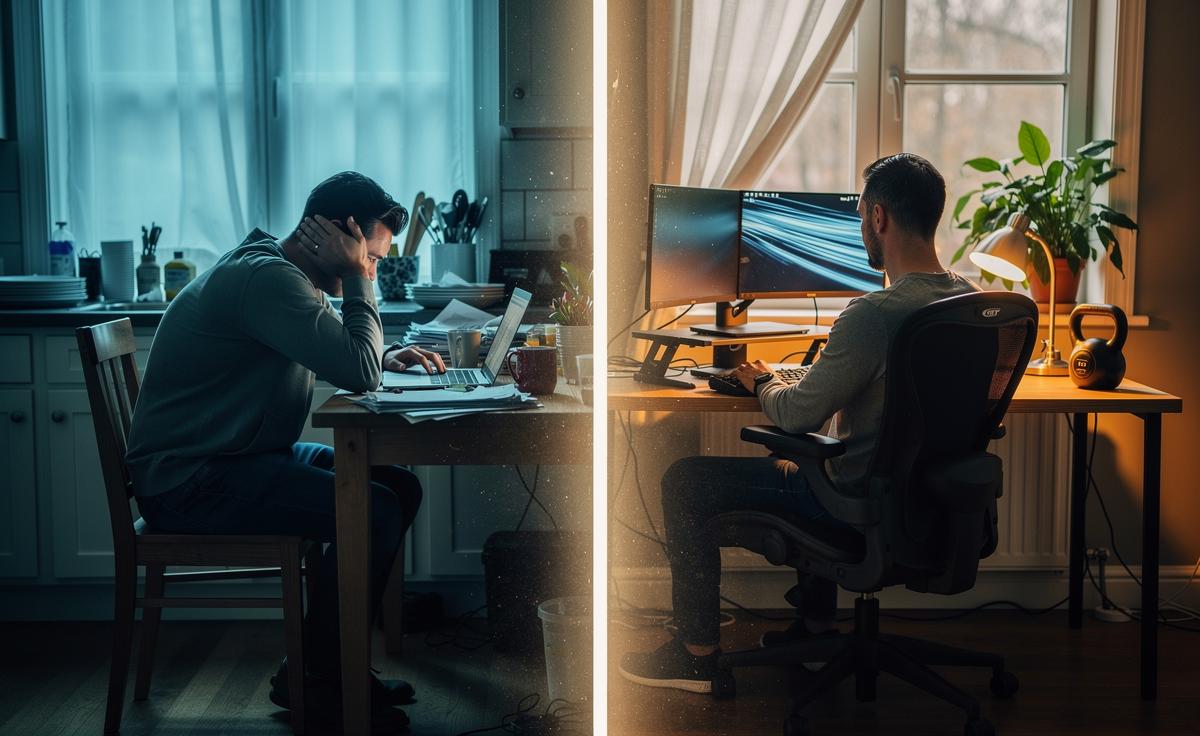
In a nutshell
- 🪑 Ergonomics: Avoid “laptop-only posture” by raising the screen, using a separate keyboard/mouse, and setting elbows at ~90°; neutral alignment and lumbar support prevent neck, shoulder, and wrist strain.
- 💡 Light, Air, Noise: Side-on daylight plus a diffused lamp cuts glare and protects circadian rhythms; ventilate to lower CO₂ and VOCs; tame spikes with soft furnishings or sound masking for steadier focus.
- 🏃 Microbreaks beat marathons: Move every 30–45 minutes—stand, stretch hip flexors, gaze far, do “movement snacks”; alternate sit–stand cycles and hydrate to reduce sedentary metabolic risk and stiffness.
- 🧭 Boundaries and rituals: Use cues (a work-only lamp, closing playlist, device cover at 6 pm) to end the day; set response windows and “no‑meeting” hours; maintain social contact to buffer stress.
- 🛠️ Small tweaks, big gains: Recheck your setup weekly; adjust seat height, monitor distance, and wrist position; better light and air plus routine movement compound into lasting comfort and focus.
Back pain that flares by midday. Headaches that creep in with every Zoom. Eyes stinging after dusk. If your routine feels strangely harder since you started working from home, you’re not imagining it. The domestic desk—kitchen tables, sofas, corners carved out of bedrooms—wasn’t designed for eight-hour stints. Subtle mismatches in height, light, and routine compound into very real health effects. Your home office can either support your body and mind or quietly drain them. With hybrid work now standard across the UK, understanding the hidden risks of our improvised setups isn’t a luxury; it’s urgent. Here’s how your environment could be shaping your wellbeing—and how to fix it.
Ergonomics: Small Misalignments, Big Consequences
It usually starts with a laptop-only posture. The screen sits low, your neck cranes, and your wrists hover above a hard edge. Hours pass. Shoulder tension rises, and a dull ache spreads across the upper back. Those “minor” misalignments multiply into load on joints, tendons, and disks. Chairs without lumbar support encourage a C-shaped slump; kitchen stools force hip flexion and compress the lower spine. When the keyboard is too high, wrists extend, inviting tendon irritation. When the monitor is too close, your eyes strain and your head creeps forward, adding kilograms of equivalent force to the cervical spine.
Good news: small adjustments deliver outsized relief. Aim for neutral joints and stable support. Feet flat or on a footrest. Elbows at roughly 90 degrees. The top of the monitor at or just below eye level, about an arm’s length away. A separate keyboard and mouse free the screen to rise. Swap rigid dining chairs for a task chair with adjustable height and lumbar support; failing that, use a rolled towel to fill the lumbar curve. Neutral alignment reduces muscular bracing and lets your body work with gravity, not against it.
| Item | Target Setup | Why It Matters |
|---|---|---|
| Seat Height | Thighs parallel; feet supported | Reduces hip pressure and lower-back strain |
| Monitor Position | Top at eye level, arm’s length | Cuts neck flexion and eye fatigue |
| Keyboard/Mous e | Close; wrists neutral | Prevents tendon stress and numbness |
Think of ergonomics as a dynamic habit, not a one-off purchase. Re-check after a week. Bodies adapt, chairs sink, tasks change. Iterate frequently to keep discomfort from settling in.
Light, Air, and the Invisible Stressors in Your Room
Home spaces weren’t built for eight hours of screen work, and the invisible environment can be punishing. Light first. Intense overhead glare bleaches your screen, forcing a squint and a forward head tilt. Weak ambient light makes your pupils work overtime. Blue-rich light early in the day can be helpful, yet late-night exposure delays circadian rhythms and frays sleep. If you sleep poorly, you feel pain more. Position your desk side-on to a window to balance daylight without glare, add a diffused desk lamp to even the contrast, and use warm light in the evening to signal wind-down.
Air quality matters just as much. A sealed, small room builds up CO₂, which can dull attention and amplify fatigue. Cleaning sprays, candles, and new furniture release VOCs, sometimes triggering headaches. Dry air irritates the throat; overly humid air invites mould. The fixes are simple. Crack a window for 10 minutes every hour or two. Add a plant for a modest bump in perceived freshness. If allergies bite, a HEPA purifier helps. Breathable, well-lit rooms make concentration feel easier and reduce the end-of-day crash.
Noise is another stealth stressor. Intermittent bursts—a motorbike, a neighbour’s drill—spike cortisol and derail deep work. Try soft surfaces to dampen echo, or noise-masking with consistent, low-level sound. The aim isn’t silence; it’s predictability. Smoother sensory input equals steadier focus.
Sedentary Habits and Microbreaks: The Metabolic Toll
The modern workday encourages stillness. Sit, click, scroll. Repeat. Hours of sedentary behavior slow circulation, let fluid pool in the lower legs, and nudge blood sugar upward after meals. Your back stiffens not because you sat, but because you sat the same way. Movement, not perfect posture, is the antidote. Short, frequent breaks beat heroic gym sessions at the end of the day when it comes to managing stiffness and alertness.
Build a break cadence you can keep. Stand or change position every 30–45 minutes. Two minutes is enough: walk to the window, do 10 calf raises, stretch hip flexors, reset your gaze to a far target to relax eye muscles. Use phone reminders or pair breaks with natural task switches—email sent, document saved, call ended. If you have a sit-stand desk, alternate two or three cycles a day; don’t just stand for hours. Variety keeps tissues perfused and the brain switched on.
Consider “movement snacks.” A kettlebell by the desk. A resistance band on the chair. Stairs instead of the kettle queue. These microdoses improve energy without derailing deep work. And hydrate. Adequate water subtly enforces standing and walking breaks. The goal isn’t perfection; it’s to prevent long, unbroken sitting spells that quietly compound into metabolic risk and persistent aches.
Boundaries, Burnout, and the Psychology of Place
At home, work bleeds into life. The commute that once signalled start and stop is gone, replaced by a laptop within arm’s reach. That proximity fosters presenteeism—just one more email—until the evening evaporates. Without boundaries, your day never quite ends, and your nervous system never fully powers down. That’s when irritability rises, sleep frays, and motivation dips. Environments teach the brain what to expect; doing it all from one chair blurs cues.
Craft rituals and zones that create psychological edges. A lamp you only switch on for work. A specific playlist that opens and closes the day. A folded throw over the laptop at 6 pm to signal “office closed.” If space allows, orient the desk away from the bed or sofa; even a room divider helps. Time-box communication windows to curb notification creep, and batch shallow tasks to reduce context switching. Protecting attention is a health intervention, not a luxury.
Humans need other humans. Remote routines can shrink social contact, which magnifies stress and dulls creativity. Book deliberate micro-social touchpoints: a walking call, a coworking morning, or a weekly café session. If you manage a team, normalise boundaries: shared “no-meeting” hours, visible lunch breaks, clear expectations on response times. Culture makes healthy behaviour possible, and your personal culture begins at your desk.
Working from home can be a gift—flexibility, focus, time reclaimed. It can also chip away at health through a thousand small frictions. Adjust the chair, raise the screen, soften the light, air the room, move a little, and draw bright lines around your hours. Small changes compound into lasting comfort, productivity, and calm. What one tweak will you test this week—and how will you know it worked?
Did you like it?4.6/5 (26)